How Maximizing Dial-up Modem Settings

September 09, 2009 · 0 comments

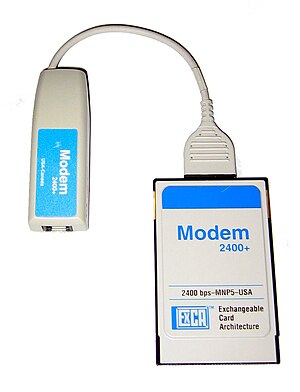
A 2400 Baud modem for a laptop. I am unable to...

Did you know that by changing a few settings you can make your dial-up modem run better? That's right—you might have a fast modem and a good connection, but you're not getting the best performance. With a few adjustments, you can get faster connection speeds.

NOTE: Since every PC configuration is different, these adjustments might not work for everyone.

With Windows 95, 98 & ME you'll need to open your Control Panel ( Start / Control Panel ). Click "System" then choose "Device Manager". Open up "Ports", highlight your modem port (should be COM2), and choose "Properties" near the bottom. When you click "Port Settings", you will see the modem speed listed under "Bits per second".

With Win XP , just hold down the Alt key and double-click "My Computer" to bring up System Properties. Click the "Hardware" tab, then choose the "Device Manager" button. Scroll down to "Modems" and click the little (—) to show your modem, then double click it.

Selecting the "Modem" tab will allow you to adjust the port speed.


Usually, the Maximum Port Speed is on the highest setting (115,000 bps), but sometimes you will find it on a slower default of 9600 bps. If you have a 56k modem, you can crank it up to the maximum setting without any trouble (in most cases). If you live in a cave and have a 28k modem, then the fastest you can do is 57,600 bps.

Win 9x users should also adjust the "Flow Control" near the bottom. The default for this is usually Xon/Xoff which is the software control—change this to "Hardware" if you want to get the most from your modem. Next, click the "Advanced" button to adjust the Receiver Buffer to its highest setting (all the way to the right). If you run into any problems, just turn this one back to the 2/3 setting.

To check/adjust the Receive-Transmit buffers in XP, click the "Advanced" tab of your modem properties then choose the "Advanced Port Settings" button. Make sure that both are set to their highest settings.

There are many more tweaks that can be done in the registry, but the potential for disaster is too high for the average user. Some folks install dial-up accelerators, which basically tweak these registry settings for you and perform other routines to optimize performance.

Just by changing these few settings, though, you should see better performance.


Reblog this post [with Zemanta]


read more

Guide For Getting Free Stuff

· 0 comments

Ok, if you are like me you have heard so much about the FreeIpods and FreeFlatScreens websites on different forums, blogs, IM's, etc, you are about to puke. So am I. But yet the draw of getting an Ipod for doing basically nothing is pretty strong. I dismissed all the "stories" of people getting their ipods as the marketing machine at work. However, when Kevin Rose published that not only did he receive his, but a few of his friends did as well, I figured I might take a chance and give it a go. Today I received proof that it does indeed work. Yep, I got my iPod.

Whats in it for them?
Step 1. Collect Names.
Step 2. Send those names items worth $200 or more
Step 3. ?????
Step 4. Profit

Before I signed up, I wanted to get to the bottom of the ?????. I didn't want any sweaty, filth pushing webmonkeys to have all my info, so I did my research. Free Internet, the parent company of the FreeIpods, FreeFlatscreens, etc. sites, recently did an interview with Wired Magazine.
In this article free states that they are acting as Head Hunters for companies (more on that later) and are paid between $50-$90 per referral. Although this seems like a lot of money, this is nothing compared to what these companies spend for print advertising which does not guarentee ANY customers. So now we know what ?????? equals. ??????=$50-$90 for free per guranteed customer (referral sites).

How Does it Work?
You sign-up on one (or more) of the following websites:

http://www.FreeMiniMacs.com/
This site gives away free Mini Macs. At the time of this writing only the 80gb MiniMac was available.

http://www.FreeDesktopPC.com/
This site gives away free flat screen monitors and TVs. At the time of this writing the following flat screens were available: Sony 19" LCD, Samsung 15" SyncMaster 510MP LCD TV, Samsung SyncMaster 710N LCD Monitor, Sony 27" FD Trinitron WEGA TV, or a 24" Toshiba TV/VCR/DVD combo

http://www.FreeGamingSystems.com/
This site gives away gaming systems. At the time of this writing the Slim PS2, Xbox, Nintendo Gamecube, and Nintendo DS were available.

http://www.FreeHandbags.com/
This site gives away high-end handbags. Might be a good surprise for your wife or girlfriend. =) At the time of this writing the following bags were available: Prada Mini-Hobo (black, Pink, Powder Blue), Burberry Novacheck Minisling, Coach Signature Demi Pouch (black, camel, purple), Kate Spade Pia Pochette (Black, Pink, Red)

http://www.mp3players4free.com/
This site gives out free mp3 players. You can get paypal $275, ipod, rio carbon, iriver, ipod mini.

http://www.dvrs4free.com/
This site gives away TiVo, Replay TV, and $275 paypal.

http://www.macminis4free.com/
Another mini mac site.

http://www.cameras4free.com/
This site is giving away high end digital cameras. At the the time of writing this, you follow cams are available: Canon Powershot S1 IS, Sony DSC-P100, Sony DSC-W1, Canon Powershot A95, $325 paypal.

Ok, so here is the tricky part. Once you sign up with one of these websites, you have to complete an "offer" from gratis's advertisers. There are numberous offers, some being better than others. Now remember the ???? = $50 - $90 equation? In order for you to receive your ipod/Flatscreen/Desktop PC/Handbag you have to refer 5, 8, or 10 of your friends, and they have to complete one of the offers as well. Then in order for them to receive theirs they need to refer others, and so on. So lets just look at why they are going to send an Ipod to you. (1(you) + 5(your friends)) x $90 = $540 - $250(ipod) = $290 profit for them just for you signing up. The advertisers are more than willing to pay, and FreeIpods is more than happy to send you your ipod. Works out for everyone.

What is the basic "lingo"?
"ref"/"referral" = The thing required to get your free items. These are your friends.
"green" = Status indicator that means your offer has been completed.
"yellow" = Status indicator that means your offer has yet to be completed or is in the process/pending.
"hold" = Means your account has been suspended or stopped. DON'T CHEAT.
"STV" = Means your product has been "Shipped To Vendor" You should recieve it in about 10 days time.

What process should you use to sign up (to ensure that you will get your item)
When signing up, it is recommended that you use Internet Explorer (sucks) some people have reported problems using other browsers (ex. Firefox, opera, etc.) Also make sure you have cookies accepted.

  1. Click on one of the links above and enter a VALID US mailing address.
  2. Complete the marketing survey - not your answers do not have any impact on you receiving your item. Just say no to them.
  3. Once you have signed up, you should receive a verification email. If you did not receive one, go to the "My Account" page and click the link to have them resend it. If you still did not get it check your spam folder.
  4. Sign-up with one of their partners and complete the offer. (see the section which offer should I choose) It can take up to 15 days for your offer to show completed. (A term that we freebie goers use for a "completed offer" is called "credit.") But usually they show completed after 24 hours. Be patient. If it doesn't show up as completed, you can email the site with proof and confirmation for signing up and they will give you credit.
Which offer should I choose?
Just so you know all offers require a credit card, **HOWEVER** not all of them cost anything! =) Here is a list of my recommended offers and I have not had any problems whatsover with doing these.

  • Video Professor: This requires a credit card and pay only $3 shipping for computer tutorial CDs. After you receive the CDs, just call customer support and cancel your membership. Return to sender the CDs and they will refund you the shipping costs.
  • Complete Home: Instant verification. Sign up for their program for $1 two month trial. You get a FREE $20 Lowes Gift Card just for doing this offer. Cancel your subscription within the 2 month trial and pay NOTHING and keep the gift card!
  • Buyer's Advantage: Instant verification. Sign up for their program for $1 two month trial. You get a FREE $20 Circuit City Gift Card just for doing this offer. Cancel your subscription within the 2 month trial and pay NOTHING and keep the gift card!
  • Great Fun: Instant verification. Sign up for their program for $1 two month trial. You get a FREE Walkie Talkie just for doing this offer. Cancel your subscription within the 2 month trial and pay NOTHING and keep the gift card!
  • Traveler's Advantage: Instant verification. Sign up for their program for $1 two month trial. You get a FREE Thin Digital Camera just for doing this offer. Cancel your subscription within the 2 month trial and pay NOTHING and keep the gift card!
  • eFax Plus: Sign up for their fax service. You get a 30 day free trial. Upon receiving credit for doing the offer, simply cancel the service within the free trial and pay nothing! It usually take 1-3 days to receive credit for this offer.
  • Blockbuster Online: Try a two week trial of Blockbuster's Netflix-like service. Cancel online within trial time and pay nothing.
  • Zooba: If you are a book fan, sign up for this offer. You get a book for $10 with free shipping. Instant verification.
  • Various Credit Card offers: Apply for a credit card and get approved. When it arrives, cut it up and toss it out. Nothing to cancel, nothing to pay, and free stuff to gain!
Many of these offers are big companies, so you do not have to question the legitimacy for signing up under them. In other words, you will be safe because you are giving your credit card information to aol, blockbuster, and general motors, and i highly doubt that they will sell this info.

These are free, as long as you cancel within the trial period. Some offer online cancellations while others require calling their support number. Just tell them that you dont find yourself using their services enough so you want to cancel and they'll cancel your membership without any problems.

Cheating
Many of these free sites take cheating very seriously. If you want your free gift and not have you account suspended, simply DON'T CHEAT! Don't refer yourself and do all the offers yourself. If you think you can cheat the system because you are a 1337 h4x0r and you can use proxies and IP spoofs to refer yourself, DON'T DO IT. When you are in the approval stage, they will intensely throughly examine your account and make sure that all your referrels are legit and unique. Trust me, I know many people who have gotten suspended for attempting to cheat.

Multiple Accounts
This goes under cheating. It is wise not to create multiple accounts under the same site because it is against the free site's TOS. They suspend you no matter what your reason is, even if it was an accident. This also includes referring family members. You can only create one account under one household, under one IP address per site. So you cannot refer mother, sister, or brother to do it unless they live in another household.

So you've ran out of offers to do. What do I do?
Ok, if you are a freebie freak, you will probably eventually run out of offers to do because of the fact that you signed up for so many free sites did all the easy free offers. What shoud you do? Remember that free sites give you credit for a unique signup for the offers. So if you signed up for blockbuster online offer at freeflatscreens, you cannot do it again for another free site such as freedesktoppc. But there is a trick to this. A unique signup = a unique credit card that you used to sign up. So if you have a another credit card, you can sign up for the offer again. Another method is to purchase a visa gift card from your mall, or go to www.webcertificate.com and purchase a virtual debit/credit card and do the offers with those.

If you followed all these steps correctly, your free gift will be delivered to your doorstep in no time.

Here are the steps:
  1. Getting friends to sign up under you
  2. Approval Stage: They will analyze your account for fraud. Takes 1 week.
  3. Pending Stage: Your account have been approved. You are now processing. This will take 1-2 weeks.
  4. STV: Sent to Vendor. Your product will arrive in 10 days.
  5. Shipped: Congrats!

Most of these freebie sites are for U.S residents only. Good Luck !


Reblog this post [with Zemanta]


read more

How to Tweak Firefox Speed ?

· 0 comments

Mozilla Firefox

Yes, firefox is already pretty damn fast but did you know that you can tweak it and improve the speed even more?

That's the beauty of this program being open source.
Here's what you do:
In the URL bar, type “about:config” and press enter. This will bring up the configuration “menu” where you can change the parameters of Firefox.

Note that these are what I’ve found to REALLY speed up my Firefox significantly - and these settings seem to be common among everybody else as well. But these settings are optimized for broadband connections - I mean with as much concurrent requests we’re going to open up with pipelining… lol… you’d better have a big connection.

Double Click on the following settins and put in the numbers below - for the true / false booleans - they’ll change when you double click.

Code:
browser.tabs.showSingleWindowModePrefs – true
network.http.max-connections – 48
network.http.max-connections-per-server – 16
network.http.max-persistent-connections-per-proxy – 8
network.http.max-persistent-connections-per-server – 4
network.http.pipelining – true
network.http.pipelining.maxrequests – 100
network.http.proxy.pipelining – true
network.http.request.timeout – 300

One more thing… Right-click somewhere on that screen and add a NEW -> Integer. Name it “nglayout.initialpaint.delay” and set its value to “0”. This value is the amount of time the browser waits before it acts on information it receives. Since you’re broadband - it shouldn’t have to wait.

Now you should notice you’re loading pages MUCH faster now!


Reblog this post [with Zemanta]


read more

Knowing Bid on Ebay

September 02, 2009 · 0 comments

VMK Ebay Auctions

This is a post about the shortest hacking that I've ever made, because it is very simple. Without a lot of touch of "bull shit". Just found this on the net, so I gave it a try.

Lo and behold, it actually works.

Very handy if you are an Ebayer. Enjoy it !

When you look at an item and click on bid history all the bid amount are replaced with "-" until the end of the auction.

To view these amounts before the auction ends when viewing the item change

http://cgi.ebay.co.uk/ws/eBayISAPI.dll

in the address bar to

http://cgi.ebay.com/ws/eBayISAPI.dll

And then click on the bid history. The bid amounts will be shown.


Reblog this post [with Zemanta]


read more

Download from PayPal Without Paying Penny

· 0 comments

The king of all Paypal phishing scams

Just a little basic html tip for those who are trying to download an application from sites which has an paypal order page & link to start you off.

Use a proxy when you try this to hide your ip as some sites will record your ip when you connect for security.

1) Rightclick your mouse (ctrl+click) viewsource and open the source of the site in an a texteditor
2) Search for the word "return"
3) Next to it you can find the url for the thank you page
4) Copy the url and paste it in your browser and you will see the download link

This works only if you can download instantly after payment, it will not work if the link needs to be emailed to you.

You can try it here to start with Code:

http://www.ramphelp.com/halfpipe.html

About half way down the page you will find:

<input name="return" value="http://www.ramphelp.com/65984523/thanks/68912hp654/26865thankyouhp08363215423.html " type="hidden">

Copy the link into your browser and download.
Good Luck !


Reblog this post [with Zemanta]


read more

Credit Card Fraud

· 0 comments

For most of you out there, money is hard to come by. Until now:

With the recent advent of plastic money (credit cards), it is
easy to use someone else's credit card to order the items you have
always desired in life. The stakes are high, but the payoff is
worth it.

Step One: Getting the credit card information

First off, you must obtain the crucial item: someone's credit
card number. The best way to get credit card numbers is to take the blue carbons used in a credit card transaction at your local department store. These can usually be found in the garbage can next to the register, or for the more daring, in the garbage dumpster behind the store. But, due to the large amount of credit card fraud, many stores have opted to use a carbonless transaction sheet, making things much more difficult. This is where your phone comes in handy.

First, look up someone in the phone book, and obtain as much information as possible about them. Then, during business hours, call in a very convincing voice - "Hello, this is John Doe from
the Visa Credit Card Fraud Investigations Department. We have been informed that your credit card may have been used for fraudulent purposes, so will you please read off the numbers
appearing on your Visa card for verification." Of course, use your imagination! Believe it or not, many people will fall for this ploy and give out their credit information.

Now, assuming that you have your victim's credit card number, you should be able to decipher the information given.

Step Two: Recognizing information from carbon copies

Card examples:

[American Express]
XXXX XXXXXX XXXXX
MM/Y1 THRU MM/Y2
JOE SHMOE

[American Express]
XXXX XXXXXX XXXXX
MM/Y1 THRU MM/Y2
JOE SHMOE

Explanation:

MM/Y1 is the date the card was issued, and MM/Y2 is the expiration date. The American Express Gold Card has numbers XXXXXX XXXXXXXX XXXXXXXX, and is covered for up to $5000.00, even if the card holder is broke.

[Mastercard]
5XXX XXXX XXXX XXXX
XXXX AAA DD-MM-YY MM/YY
JOE SHMOE

Explanation:
XXXX in the second row may be asked for during the ordering process. The first date is when the card was new, and the second is when the card expires. The most frequent number
combination used is 5424 1800 XXXX XXXX. There are many of these cards in circulation, but many of these are on wanted lists, so check these first.

[Visa]
4XXX XXX(X) XXX(X) XXX(X)
MM/YY MM/YY*VISA
JOE SHMOE

Explanation:
Visa is the most abundant card, and is accepted almost everywhere. The "*VISA" is sometimes replaced with "BWG", or followed with a special code. These codes are as follows:

[1] MM/YY*VISA V - Preferred Card
[2] MM/YY*VISA CV - Classic Card
[3] MM/YY*VISA PV - Premier Card

Preferred Cards are backed with money, and are much safer to use. Classic Cards are newer, harder to reproduce cards with decent backing. Premier Cards are Classic Cards with Preferred
coverage. Common numbers are 4448 020 XXX XXX, 4254 5123 6000 XXXX, and 4254 5123 8500 XXXX. Any 4712 1250 XXXX XXXX cards are IBM Credit Union cards, and are risky to use, although they are usually covered for large purchases.

Step Three: Testing credit

You should now have a Visa, Mastercard, or American Express credit card number, with the victim's address, zip code, and phone number. By the way, if you have problems getting the address, most phone companies offer the Address Tracking Service, which is
a special number you call that will give you an address from a phone number, at a nominal charge. Now you need to check the balance of credit on the credit card (to make sure you don't run out of money), and you must also make sure that the card isn't stolen. To do this you must obtain a phone number that businesses use to check out credit cards during purchases. If you
go to a department store, watch the cashier when someone makes a credit card purchase. He/she will usually call a phone number, give the credit information, and then give what is called a "Merchant Number". These numbers are usually written down on or around the register. It is easy to either find these numbers and copy them, or to wait until they call one in. Watch what they dial and wait for the 8 digit (usually) merchant number. Once you call the number, in a calm voice, read off the account number, merchant number, amount, and expiration date. The credit bureau will tell you if it is ok, and will give you an authorization number. Pretend you are writing this number down, and repeat it back to them to check it. Ignore this number completely, for it
serves no real purpose.

However, once you do this, the bank removes dollars equal to what you told them, because the card was supposedly used to make a purchase. Sometimes you can trick the operator by telling her the customer changed his mind and decided not to charge it. Of course, some will not allow this. Remember at all times that you are supposed to be a store clerk calling to check out the card for a purchase. Act like you are talking with a customer when he/she "cancels".

Step Four: The drop

Once the cards are cleared, you must find a place to have the package sent. NEVER use a drop more than once. The following are typical drop sites:

[1] An empty house

An empty house makes an excellent place to send things. Send the package UPS, and leave a note on the door saying, "UPS. I work days, 8 to 6. Could you please leave the package on the back door step?" You can find dozens of houses from a real estate agent by telling them you want to look around for a house. Ask for a list of twenty houses for sale, and tell them you will check out the area. Do so, until you find one that suits your needs.

[2] Rent A Spot

U-Haul sometimes rents spaces where you can have packages sent and signed for. End your space when the package arrives.

[3] People's houses

Find someone you do not know, and have the package sent there. Call ahead saying that "I called the store and they sent the package to the wrong address. It was already sent, but can you
keep it there for me?" This is a very reliable way if you keep calm when talking to the people.

Do NOT try post office boxes. Most of the time, UPS will not deliver to a post office box, and many people have been caught in the past attempting to use a post office box. Also, when you have determined a drop site, keep an eye on it for suspicious characters and cars that have not been there before.

Step Five: Making the transaction

You should now have a reliable credit card number with all the necessary billing information, and a good drop site.

The best place to order from is catalogues, and mail order houses. It is in your best interest to place the phone call from a pay phone, especially if it is a 1-800 number. Now, when you call,
don't try to disguise your voice, thinking you will trick the salesperson into believing you are an adult. These folks are trained to detect this, so your best bet is to order in your own
voice. They will ask for the following: name, name as it appears on card, phone number, billing address, expiration date, method of shipping, and product. Ask if they offer UPS Red shipping (next
day arrival), because it gives them less time to research an order. If you are using American Express, you might have a bit of a problem shipping to an address other than the billing address.
Also, if the salesperson starts to ask questions, do NOT hang up. Simply talk your way out of the situation, so you won't encourage investigation on the order.

If everything goes right, you should have the product, free of charge. Insurance picks up the tab, and no one is any wiser. Be careful, and try not to order anything over $500. In some states,
UPS requires a signature for anything over $200, not to mention that anything over $200 is defined as grand theft, as well as credit fraud. Get caught doing this, and you will bite it for a
couple of years.

Good luck!


read more

Site Sponsors

GUEST COMMENT

Followers